Manage Tickets
Purpose of the Module
The Customer Care module in the HelloMe Money Admin Panel is a centralized ticket management system designed to:
- Track and manage remitter issues, complaints, and service requests.
- Provide visibility for agents, compliance officers, and support staff to resolve customer problems.
- Ensure prompt and traceable responses to maintain service quality, trust, and timeliness in financial services.
It forms a customer-facing support backbone, integrated with remittance processes and compliance oversight.
Key Search and Filter Options
Admins can filter or locate support tickets by:
- Subject (e.g., “Delay in Transaction”, “Unable to add beneficiary”)
- Assigned User (responsible support agent or compliance officer)
- Type (e.g., “KYC Issue”, “Transaction Error”, “Compliance Query”)
- Priority (Low, Medium, High, Urgent)
- Status (Open, In Progress, Resolved, Closed, Need Review, Escalated)
Ticket Table Overview
| Field | Description |
|---|---|
| Date | When the ticket was created |
| Subject | Issue summary |
| Description | Full details of the issue |
| Remitter Name/Email | Who raised the complaint (auto-fetched) |
| Last Reply | Timestamp of last staff response |
| Type | Nature of the issue |
| Priority | Urgency level |
| Assigned To | Assigned staff/agent |
| Reference Number | Related transaction reference |
| Status | Workflow stage (e.g., Open, Resolved) |
| Action | View, reply, edit, or escalate the ticket |

When Admin clicks on "View Ticket" They Get a broader details on the ticket.
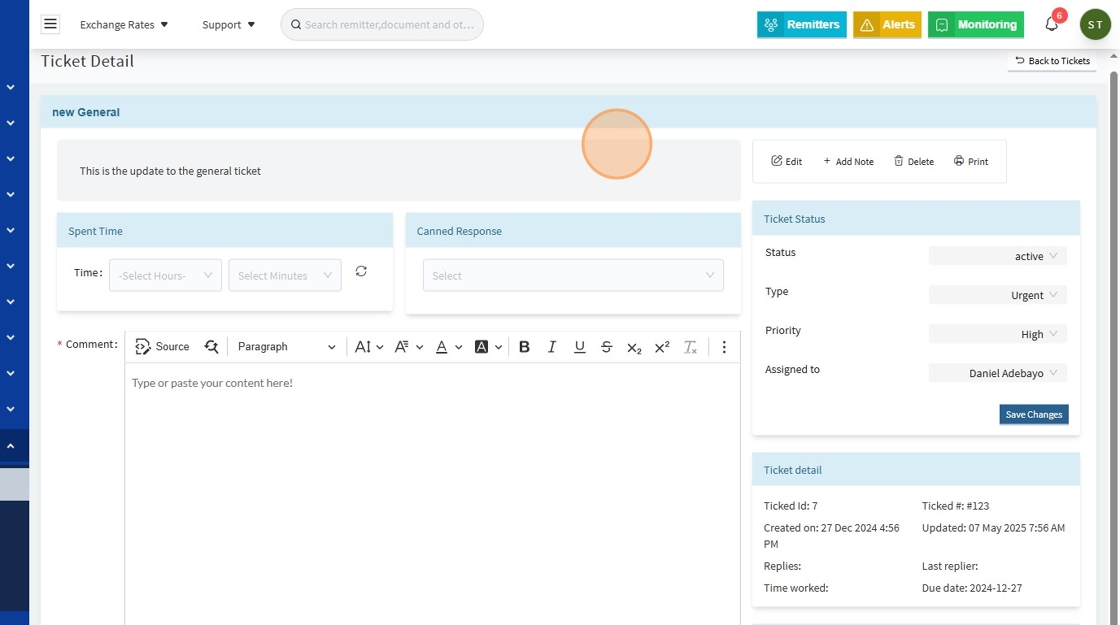
Overview
When an admin clicks to view a ticket, the following sections are visible:
- General Information: Title, description, and purpose of the ticket.
- Spent Time Tracking: Track hours and minutes spent on resolution.
- Canned Responses: Use pre-written templates for efficiency.
- Comments: Add and view threaded internal and customer-facing comments.
- Attachments: Upload and review relevant documents/screenshots.
- Status Management: Update ticket status, priority, type, and assignee.
- History: View the audit log for transparency and compliance.
Example Data Snapshot
Title: New General
Description: This is the update to the general ticket.
Spent Time:
- Hours: Select Hours
- Minutes: Select Minutes
Canned Response: Select
What is a Canned Response?
Please note: A canned response is a pre-written, reusable message template that support agents or compliance officers can quickly insert when replying to tickets within the HelloMe Money Admin Panel.
Example Canned Responses
- KYC Document Request
“Thank you for reaching out. Please upload a clear photo of your valid government-issued ID to proceed with your verification.”
Comment Section:
| User | Comment Text | Date & Time |
|---|---|---|
| Joshua Ayeni | This is updated content | 21 Mar 2025, 7:22 PM |
| Joshua Ayeni | Testing comment | 05 May 2025, 3:42 AM |
Attachments: Upload or view related files.
Ticket Information
- Ticket ID: 7
- Ticket #: #123
- Created on: 27 Dec 2024, 4:56 PM
- Updated on: 07 May 2025, 7:56 AM
- Due Date: 27 Dec 2024
- Type: (e.g., Transaction Error, KYC Issue)
- Priority: (Low, Medium, High, Urgent)
- Status: (Open, In Progress, Resolved, Closed, Need Review, Escalated)
- Assigned To: Responsible agent or compliance officer
- Last Replier: System/user last to comment
- Time Worked: Total tracked hours/minutes
Replies Section
All staff and customer comments appear in a threaded format, including:
- Username of commenter
- Comment text
- Timestamp of comment
This allows clear tracking of conversations for both internal and external communications.
Ticket History
Tracks all updates for auditability. In the provided example:
“No Activity Log for this ticket.”
When active, this will display:
- Status changes
- Priority updates
- Assignment changes
- Edits to ticket details
- Resolution timestamps
Key Functions Available in Ticket Detail
✅ View full ticket context in one place
✅ Update ticket status, priority, type, and assignee
✅ Track and log time spent on the ticket
✅ Use canned responses for consistency
✅ Attach and view relevant documents
✅ Comment and collaborate across support/compliance teams
✅ Maintain an audit log for compliance and operational transparency
Why This Matters
The Ticket Detail View ensures:
- Clarity: Full visibility into the complaint or request.
- Traceability: All actions and updates are tracked.
- Collaboration: Enables support and compliance teams to work seamlessly.
- Regulatory Readiness: Supports audit processes and dispute resolution with clear, timestamped logs.
Adding a Ticket
Admins/support can manually log complaints:
- Subject: Summary of the issue
- Ticket #: Custom/internal reference
- Description: Full customer concern
- Type: Category (e.g., Transaction Delay)
- Priority: Urgency
- Attachment: ID, screenshots, receipts
